
SEO Internal Linking: Boost Rankings & Crawl Efficiency
Backlinks get the headlines, but one of the strongest ranking levers sits entirely under your control: SEO internal linking. You decide which pages link to which, what anchor text they use, and how much authority each page passes along. No outreach, no approvals, no budget.
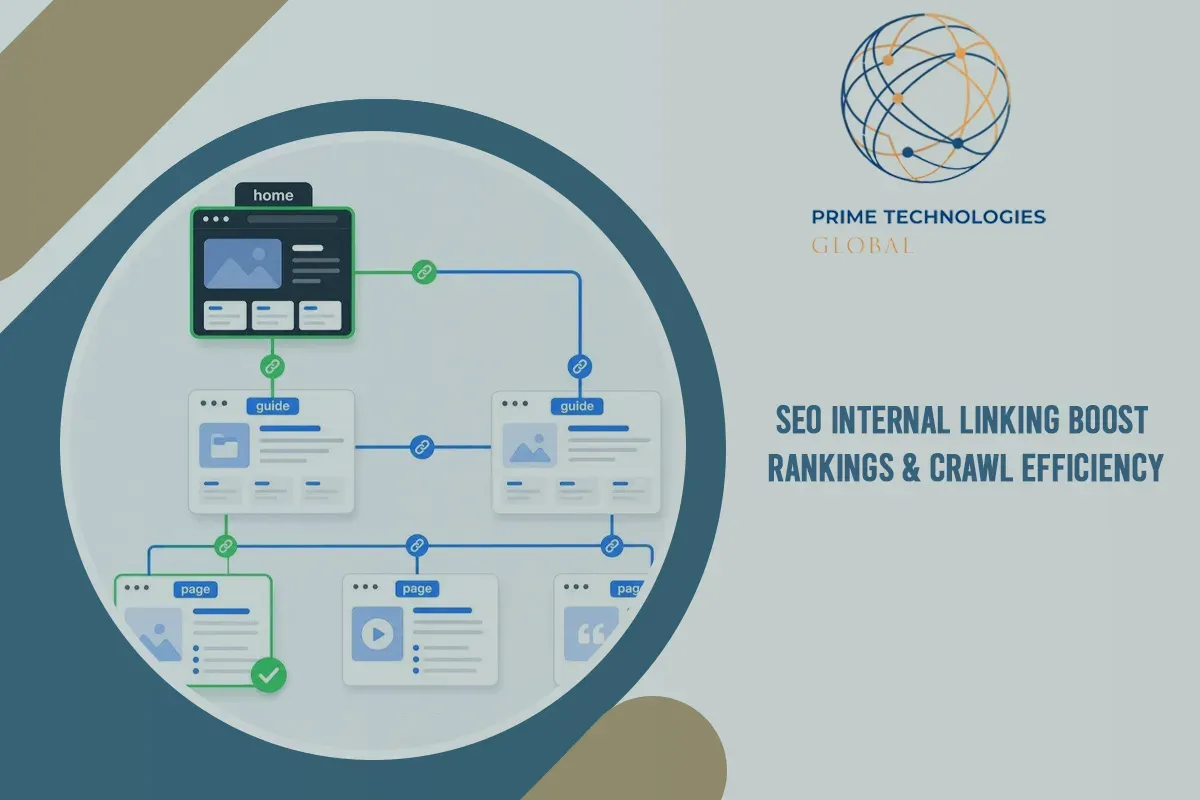
Done well, internal linking turns a pile of loose pages into a structured site that crawlers can map and readers can navigate. Done poorly, it leaves orphan pages that never get indexed, competing pages that cannibalize each other, and a crawl budget spent on URLs that earn nothing.
This guide shows you how internal links work, how to build topic clusters, how to write anchor text that helps instead of hurts, and how to run an internal link audit that uncovers growth you already own.
Key takeaway: Internal links tell search engines which pages matter, how they relate, and where to crawl next. Every page you publish should both give and receive them.
What You Will Learn
- What internal linking is and how Google uses it to crawl and rank pages
- The difference between navigational and contextual internal links
- How to design topic clusters with pillar and supporting pages
- Anchor text rules that avoid over-optimization
- Advanced tactics: orphan page recovery, click depth, and passing authority to weak pages
- The most common internal linking mistakes and how to fix them
- The tools and workflow to keep your internal link structure healthy
What Is Internal Linking?
An internal link is a hyperlink that points from one page to another page on the same domain. If your blog post links to your services page, that is an internal link. Search engines follow these links the same way readers click them.
Internal links sit alongside two other link types:
- Backlinks (inbound links): links from other websites to yours. You earn them, and you do not control them.
- Outbound (external) links: links from your pages to other websites.
- Internal links: links between pages on your own site. You control every one.
If you are asking what is internal linking in practical terms, it is the system that connects your content into a single, navigable structure. That system is the core of linking in SEO that you can change today.

How Search Engines Use Internal Links
Googlebot discovers most pages by following links from pages it already knows. Google's own Search Central documentation on links explains that crawlable links help it find pages and understand context. Internal links do four jobs:
- Discovery and crawling. A page with no links pointing to it is hard for crawlers to find. New posts that receive links from established pages get discovered faster.
- Site structure mapping. Links reveal hierarchy. A category page that links to ten articles tells search engines those ten articles belong together.
- PageRank and link equity distribution. Pages with strong authority, often from earned backlinks, pass a share of that value to the pages they link to. A well-linked page tends to carry more weight than an isolated one.
- Context. The anchor text and the text around a link describe the destination page, which helps search engines judge what it is about.
The User Experience Connection
Search engines are not the only audience. A good link answers the question a reader has at that exact moment: "Where do I learn more about this?" When readers find that answer on your site, they view more pages and stay longer.
That behavior is not a guaranteed ranking factor, but it supports the goals your SEO serves: engaged visitors, clearer buyer journeys, and more conversions.
Do Internal Links Help SEO?
Yes. Internal links help SEO in three ways you can verify in your own data: they speed up discovery of new pages, they pass authority from strong pages to weaker ones, and they clarify topic relationships. The benefits of internal linking compound as your site grows, because each new page can reinforce the pages around it.
Key takeaway: Internal links are the only part of link building you control completely. Treat them as infrastructure, not decoration.
Types of Internal Links and Their Strategic Roles
Not every internal link does the same job. Knowing the types of internal links lets you decide where each one belongs and how much work it should do.
Navigational Links
Navigational links sit in repeating site elements: header menus, footers, sidebars, and breadcrumbs. They appear on many or all pages, so they give every key page a baseline of internal links and help users move around.
Breadcrumbs deserve special attention. They show the path from the homepage down to the current page and reinforce your hierarchy on every URL they appear on.
Contextual (In-Body) Links
Contextual links are text links placed inside the main content of a page, such as a blog post that links to a related guide. They are the most flexible tool in your internal link building workflow because you choose the destination, the anchor text, and the surrounding sentence.
Why contextual links tend to carry more weight: the text around the link describes the destination, and the link sits in the primary content rather than a repeated template element. Search engine patent discussions on link placement and prominence point the same direction, though Google has not published an exact weighting. Treat contextual links as your highest-value placements and prioritize them accordingly.
Structural Link Types
Structural links are generated by templates or taxonomy:
- Related post widgets: automated links to similar articles at the end of a post.
- Subpage matrices: a parent page that lists and links all of its child pages.
- Category and tag links: taxonomy links that group content by topic.
These scale well, but they work best as a supplement. Manual contextual links usually describe relationships more precisely than an automated widget.

Internal Link Types Compared
|
Link type |
Primary function |
Typical location |
SEO weight impact |
|
Navigational (menu, footer) |
Site-wide access to key pages |
Header, footer, sidebar |
Moderate: broad reach, little topical context |
|
Breadcrumbs |
Show hierarchy and path |
Top of page |
Moderate: reinforce structure |
|
Contextual (in-body) |
Connect related topics with descriptive anchors |
Main content |
High: strong topical signal |
|
Related post widgets |
Surface similar content automatically |
End of article |
Low to moderate: depends on relevance |
|
Subpage matrices |
List all child pages from a parent |
Pillar or category pages |
Moderate to high: clear hierarchy |
|
Category and tag links |
Group content by taxonomy |
Posts and archive pages |
Low to moderate: avoid thin tag pages |
Key takeaway: Use navigation for access, structural links for scale, and contextual links for relevance. Your best internal links are the ones a human editor would add by hand.
Topic Clusters: Using Internal Linking for SEO to Build Topical Authority
Isolated posts compete for attention. Grouped posts build authority together. A topic cluster is the most reliable internal linking structure for doing that, and it is the foundation of any serious internal linking strategy.
The Hub-and-Spoke Model
The model has two page roles:
- Pillar page (hub): a broad, comprehensive resource targeting a high-volume, head term. Example: a complete guide to email marketing.
- Cluster pages (spokes): focused articles that answer specific long-tail questions inside the topic. Examples: email subject line testing, list segmentation, and deliverability troubleshooting.
The pillar summarizes each subtopic and links to the detailed page. Each cluster page goes deeper on one question and links back to the pillar.
Bi-Directional Linking
Links must run both ways for the cluster to work:
- Cluster to pillar: every supporting article links up to the pillar, ideally in the first few paragraphs, with descriptive anchor text.
- Pillar to cluster: the pillar links down to every supporting article, so authority and crawl paths flow to the detailed pages.
- Cluster to cluster: link siblings where a reader would naturally want the next step. Skip forced links between loosely related posts.
How to Build a Cluster in Five Steps
- Pick a core topic that connects to a product or service you sell.
- List the questions your audience asks, using search suggestions, People Also Ask boxes, and your own customer emails.
- Group questions into one pillar and four to ten supporting topics, depending on how deep the subject goes.
- Publish or update the pages, then add the links in both directions.
- Review the cluster quarterly and add pages where gaps appear.
Preventing Equity Leakage with Semantic Silos
A silo keeps related content linked tightly together and limits links to unrelated categories. A page about internal links and a page about payroll software have little reason to connect, and a link between them dilutes the topical signal of both.
That does not mean never linking across topics. It means every cross-topic link should have a clear reason a reader would click it.
Why Clusters Matter for AI Search and GEO
Generative Engine Optimization (GEO) is the practice of structuring content so AI-driven search features can pull accurate answers from it. Organized clusters help because each page covers one question clearly, and the links between pages show how the answers relate.
No one outside the search engines can say exactly how AI summaries choose sources. A clear structure, direct answers, and consistent terminology are still the safest bets.
Key takeaway: A pillar without supporting pages is a long article. A set of supporting pages without a pillar is scattered content. The links between them create the authority.
Anchor Text for Internal Links SEO: Best Practices Without Over-Optimization
Anchor text is the visible, clickable text of a link. It tells readers and search engines what to expect on the other side. Google's link best practices say anchor text should be descriptive, concise, and relevant to the page it links to, and that links need to be crawlable <a> elements with an href attribute.
Types of Anchor Text
|
Anchor type |
Example (linking to this guide) |
Best use |
|
Exact match |
seo internal linking |
Sparingly, when it reads naturally |
|
Partial match |
guide to internal linking for SEO |
Your main workhorse |
|
Descriptive or topical |
how to build internal links for your blog |
Strong choice for contextual links |
|
Brand name |
Prime Technologies Global |
Links to homepage or brand pages |
|
Generic |
click here, read more |
Avoid for in-body links |
|
Naked URL |
https://example.com/guide |
Citations and references only |
Internal Linking Best Practices for Anchor Text
Describe the destination. A reader should know what the next page covers before clicking. "Run an internal link audit" beats "this page."
- Write for the reader first. If the anchor feels forced, rewrite the sentence.
- Vary your wording. Link to one URL from different pages using different, natural phrasings. Identical anchors repeated everywhere look templated.
- Keep anchors short. Two to six words usually work. Linking a full sentence dilutes the signal.
- Match the anchor to the page's real topic. The anchor is a promise. The destination page must keep it.
- Add alt text to image links. Google treats the alt attribute of a linked image as its anchor text.
The Danger of Over-Optimization
Using the same exact-match phrase on every internal link can look manipulative and reads badly. There is no published number for how many exact-match anchors is too many, so rely on judgment: if a human editor would not write it, do not publish it.
A useful test is to read the sentence aloud. If the link sounds like it was inserted by a plugin rather than a person, change it.
What the Research Says
SEO tool providers such as Ahrefs, Semrush, and Yoast publish internal linking guidance and studies, and most of it points the same way: descriptive anchor text and relevant link placement align with better-performing pages. Keep in mind that these findings show correlation, not proof of cause. Yoast's internal linking guide is a solid starting point, and your own Google Search Console data is the best test of what works on your site.
Key takeaway: Good anchor text is specific, natural, and varied. If it would make sense to a reader who sees only the link text, it will make sense to a search engine.
Advanced SEO Internal Linking Strategies for Growth
Once your clusters and anchors are in order, these tactics find the remaining gains. Most of them cost nothing but analysis time.
Identify and Fix Orphan Pages
An orphan page has zero internal links pointing to it. Crawlers that rely on links may never find it, and even if it is indexed through a sitemap, it receives no internal authority.
To detect orphans, compare three lists: URLs in your XML sitemap, URLs found by a site crawl, and URLs that get impressions in Google Search Console. A URL that appears in the sitemap or Search Console but not in the crawl has no internal path to it.
Keep Important Pages Within Three Clicks
The "3-click rule" is a guideline, not a Google requirement. The idea is simple: your most important pages should be reachable from the homepage in a few clicks, because pages buried deep in the structure get crawled less often and receive less internal authority.
There is no hard cutoff. Use click depth as a diagnostic: if a revenue page sits six clicks deep, add a link from a higher-level page.
Pass Authority from High-Backlink Pages
Some of your pages earn far more external links than others. Those pages hold authority that can flow to the pages you want to lift.
- Export your pages by referring domains from your backlink tool.
- Pick the top performers that are topically relevant to a lower-ranking target page.
- Add a contextual link from each strong page to the target, with descriptive anchor text.
- Track the target page's impressions and average position in Search Console for the next several weeks.
Handle Nofollow and Crawl Budget Carefully
Older SEO advice recommended adding rel="nofollow" to internal links such as login pages and privacy policies to "sculpt" PageRank. That tactic no longer works as intended, so do not rely on it. No-follow on internal links is rarely the right tool.
For crawl control, use the right mechanism instead:
- robots.txt to stop crawlers from requesting low-value URL patterns, such as internal search results or filtered parameter pages.
- no-index to keep thin pages out of search results while still letting crawlers follow their links.
- Canonical tags to consolidate duplicate versions of one page.
Crawl budget matters mainly for very large sites with many thousands of URLs. Small and mid-size sites rarely hit it, so fix orphan pages and broken links first.
Internal Link Opportunities Checklist
Use this numbered process every quarter:
- Crawl your site with Screaming Frog, Sitebulb, or WebSite Auditor.
- Filter by incoming internal links and isolate pages with zero inlinks.
- Map each orphaned page to the topic cluster it belongs to.
- Insert two to four contextual links from relevant, high-authority pages into each orphaned page.
- Link out from the orphan too, so it connects to the pillar and sibling pages.
- Recrawl and confirm that the new links resolve with a 200 status and a canonical target.
- Monitor impressions, clicks, and indexing status for the updated pages.
Key takeaway: The fastest wins usually come from existing pages: link strong pages to weak ones and connect anything that has no inbound links.
5 Internal Linking Mistakes That Hurt Your Search Performance
Most internal linking problems are quiet. Nothing breaks visibly, but rankings stall and crawlers waste time. Check your site for these five.
1. Broken Internal Links (404 Errors)
A link to a deleted or renamed page creates a dead end for users and crawlers. It also wastes the authority the link would have passed.
Fix: crawl the site, filter for 4xx responses, and update each link to the correct live URL. Redirect removed pages to the closest relevant replacement.
2. Too Many Links on a Page
Google no longer publishes a hard limit on links per page. The problem is practical: when a page carries dozens of links, each one gets less attention from readers, and the page looks cluttered.
Fix: keep links purposeful. Cut any link that does not help the reader's next step, and move bulk navigation into menus or hub pages.
3. Redirect Chains and Loops
When link A redirects to B, which redirects to C, crawlers must make several requests before reaching the final page. A loop traps them entirely.
Fix: update internal links to point straight to the final 200-status URL. Reserve redirects for old URLs you cannot control, such as external backlinks.
4. Linking to Non-Canonical URLs
If a page has several URL versions (with parameters, trailing slashes, or HTTP versus HTTPS), internal links to the wrong version send signals to a URL you do not want ranked.
Fix: link to the canonical version everywhere, and make sure your canonical tags and sitemap agree.
5. Keyword Cannibalization Through Identical Anchors
Using the same anchor text to point to two different pages tells search engines both pages are the best answer for that phrase. They compete, and neither performs as well as it could.
Fix: assign one primary page to each target phrase. Use that anchor for that page only, and use distinct anchors for related pages.

Quick Reference
|
Mistake |
Impact |
How to find it |
Fix |
|
Broken links |
Dead ends, lost equity |
Crawler 4xx report |
Update or redirect |
|
Too many links |
Visual clutter, diluted attention |
Outlinks count per page |
Prune low-value links |
|
Redirect chains |
Slower crawling, extra hops |
Crawler redirect report |
Link to final URL |
|
Non-canonical links |
Equity sent to the wrong URL |
Canonical mismatch report |
Link to canonical |
|
Identical anchors |
Competing pages |
Anchor text report |
One anchor, one page |
Internal Linking Tools and Workflows for Ongoing Maintenance
Internal linking is never finished, because every new page changes the structure. The right internal linking tool saves hours, but the workflow matters more than the software.
Crawl and Audit Tools
An internal link audit starts with a crawl. These tools show inlinks, outlinks, click depth, status codes, and anchor text for every URL:
- Screaming Frog SEO Spider: a desktop crawler that reports inlinks, anchors, and orphan candidates when you connect sitemap and analytics data.
- Sitebulb: a crawler with visual link maps and prioritized hints.
- Semrush Site Audit: a cloud crawler that flags broken links, redirect chains, and pages with few internal links.
- Ahrefs Site Audit: a cloud crawler with internal link reports and link opportunity suggestions.
- WebSite Auditor: a desktop tool that visualizes link structure and click depth.
CMS Plugins and AI-Assisted Tools
If you run WordPress, plugins can suggest links while you write:
- Yoast SEO Premium: suggests related content to link to inside the editor.
- Link Whisper: recommends internal link placements based on your existing content.
- Rank Math: offers link suggestions and tracks internal link counts per post.
Treat every suggestion as a draft. Automated tools match words, not intent, so a human should confirm that each link helps the reader and that the anchor reads naturally.
Google Search Console
The Links report in Google Search Console shows your top internally linked pages. Compare that list with your priorities. If a key service page appears far below a minor blog post, you have found an internal link opportunity.
Use the Performance report alongside it to spot pages with strong impressions but poor positions. Those pages are prime candidates for new internal links.
A Repeatable Internal Link Maintenance Workflow
|
Cadence |
Task |
Output |
|
Every new post |
Add three to five relevant links out, and request links in from related older posts |
Connected new content |
|
Monthly |
Crawl for 404s, redirect chains, and orphan pages |
Fix list |
|
Quarterly |
Review clusters, pillar pages, and top-linked pages in Search Console |
Updated link map |
|
After a site migration or redesign |
Full crawl and comparison with the previous structure |
Verified structure |
Key takeaway: Pair one crawler with one habit. A monthly crawl plus a link check on every new post beats a one-time cleanup.
Make SEO Internal Linking an Ongoing Habit
SEO internal linking is not a one-time cleanup. It is a maintenance discipline that shapes how search engines understand, crawl, and rank your site. Build the structure once, then protect it with every page you publish.
Key Takeaways
Internal links help search engines discover pages, understand hierarchy, and pass authority between pages.
- Contextual links with descriptive anchor text carry the strongest topical signal.
- Topic clusters with two-way links between pillar and supporting pages build topical authority.
- Vary anchor text, keep it natural, and never point one phrase at two different pages.
- Find orphan pages, shorten click depth to key pages, and link from backlink-rich pages to weaker ones.
- Fix 404s, redirect chains, and non-canonical links before they pile up.
- Run a crawl monthly and review clusters quarterly.
Scale Your Strategy with Prime Technologies Global
A technical-grade internal link architecture takes data, discipline, and time. Prime Technologies Global helps businesses grow organic visibility through technical SEO, custom web architecture, and strategic content engineering.
If you need an SEO audit that maps your orphan pages and link gaps, a content workflow built around topic clusters, or a site structure ready to scale, our team can build it with you.
Ready to turn your site structure into a ranking advantage? Contact Prime Technologies Global for an internal link audit and a clear action plan for your next 90 days.
Frequently Asked Questions
What is internal and external linking in SEO?
Internal links connect pages on the same website, such as a blog post linking to your services page. External links point from your site to a different domain. Internal links shape how search engines crawl and understand your site. External links add context and cite sources, which builds trust with readers.
Is SEO dead now with AI?
No. AI-powered search features still pull from web pages, so pages need to be crawlable, clearly structured, and credible to be used as sources. What has changed is that answers now appear in more places, and some searches end without a click. Strong internal linking and well-organized topic clusters support both traditional rankings and AI visibility, because they make your content easier to find and interpret.
What are the best internal linking tools for SEO?
For audits, Screaming Frog, Sitebulb, Semrush Site Audit, Ahrefs Site Audit, and WebSite Auditor all show inlinks, anchor text, and click depth. For writing-time suggestions on WordPress, Yoast SEO Premium, Link Whisper, and Rank Math help you spot link opportunities. Google Search Console is free and shows your most internally linked pages. The best choice depends on your site size, your CMS, and your budget.
What is the difference between backlinks and internal links?
Backlinks come from other websites and point to yours, so you earn them through content, outreach, and reputation. Internal links come from your own pages and point to your own pages, so you control every detail. Backlinks bring authority into your domain, and internal links distribute that authority across your pages. The two work together: backlinks fill the reservoir, and internal links decide where the water flows.